
Product ad images: write a brief that produces a reviewable creative pack
A product advertising image brief should explain what each image must communicate and which product details must remain accurate. Nexscope’s advertising image service lets you request a chosen quantity, overall direction and individual image requirements, with review before delivery. Start with a small pack for a specific placement instead of an open-ended request to make the product look better.
Give each image a different job
Download the product advertising image brief. Record the exact item, approved references, target audience, placement, required visual information and claims to exclude.
| Creative job | Brief direction | Product check |
|---|---|---|
| Show the offer | Product-first composition with clear contents | Included pieces and quantity match |
| Explain the context | A relevant setting around the item | Props are not presented as included equipment |
| Clarify a detail | Close view of a real component | Geometry, connection and proportion match the reference |
These are three suggested jobs, not a fixed service bundle. The current form supports 1–20 images, priced per image. Select what you need and inspect the total quote before confirming.
See three different concepts in the public report
The image section of the public PCIQUTE report presents a product-first square composition, a wide decorating scene and a vertical detail. The saved November 5, 2026 example shows how different briefs can address the same product.
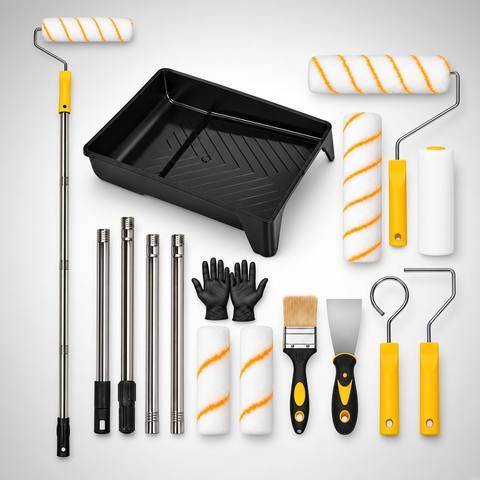

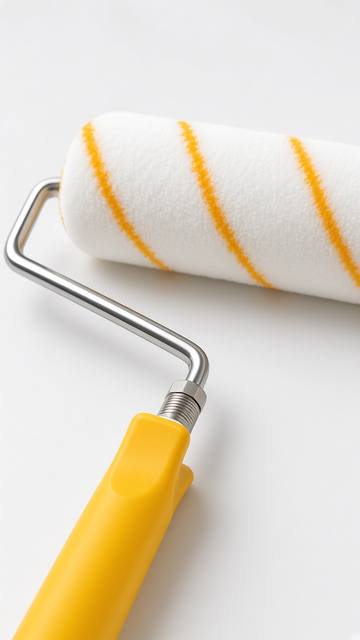
These are existing JPEG previews, not original-resolution deliveries. The example’s recorded requested dimensions do not independently verify the preview files or every future deliverable. Purchased image files can be previewed and downloaded as PNG after delivery.
Write the brief in four parts
Product: identify the exact variant, visible parts and what is included. Provide a clear reference and extra detail views where the brief needs information the main view cannot show.
Audience and setting: say what the image is for and what context helps the buyer. Distinguish a scene prop from an item included in the offer.
Composition and size: choose Auto sizing or specify custom dimensions for a defined destination. Auto selects a suitable size for the direction; it does not promise unlimited resolution. Check the actual pixels and crop of delivered files against the destination requirements.
Text and evidence: state whether you want a text-free concept or approved wording. Do not use the image to imply certifications, strength, reach or accessories that have not been established.
Choose the reviewed service or a self-service tool
Select Advertising images in the Product Growth Report form when you want to submit a brief and receive selected materials after human review. Choose the count and per-image directions, then inspect the quote. SEO and GEO analyses accompany at least one paid service selection.
Use the AI product photography workflow when you prefer to select a model and generate candidates yourself. Developers can instead use the image API tutorial. These routes differ in who configures the request, reviews intermediate outputs and applies the result.
The reviewed image service does not include ad-account management, platform approval, unlimited revisions, editable source-design files or a measured performance lift. If you also need a complete listing rewrite, select product copy rewriting rather than inferring it from a short image caption.
Approve the product before judging the scene
Compare each delivered original with the real reference. Check quantity, component shape, labels, connectors and the relationship between props and included contents. Confirm visible wording against approved product facts. A strong composition can still depict the wrong item.
Keep the image ID, actual dimensions, reviewer and decision. A delivery review does not remove the merchant’s need to inspect the chosen asset for its specific placement. Test campaign performance only after a factual and destination check; creative approval alone does not predict advertising results.
The report request guide explains access and delivery. The Black Friday creative-pack guide covers a separate self-directed still-and-video exercise if your next step is motion rather than this image service.
Frequently asked questions
How many advertising images can I request?
The current Product Growth Report form supports 1–20 advertising images, charged per image. Review the configuration and total credit quote before submitting.
What does Auto image size mean?
Auto chooses a size for the creative direction. You can alternatively request custom dimensions. Auto does not mean unlimited resolution; inspect the actual delivered image dimensions.
Does ordering images include advertising management?
No. The service provides selected creative deliverables reviewed before release. Campaign setup, ad submission, platform approval and performance testing remain separate tasks.
Sources and scope
- Nexscope Product Growth Report — current product description and service boundaries.
- Current request form — available configuration and quote.
- Nexscope public report example — saved November 5, 2026 illustration. Its observations and selected services are not a fixed package or a customer success claim.
Nexscope publishes this guide and provides the service. No new report purchase, customer survey or before-and-after performance experiment was conducted for this article.
Last reviewed: 2026-11-06 · Maintained by the official Nexscope team · Editorial & evidence policy.