
Prime Big Deal Days 2026: An Amazon Seller’s Competitor Research Checklist
By Nexscope Team · Published September 21, 2026
Amazon’s Prime Big Deal Days returns October 6–7, 2026. For sellers, the useful question is not simply, “How deep should my discount be?” It is: Which comparable products are changing price, which customer needs are they targeting, and what evidence would justify a response that still protects margin?
This checklist shows how to build a pre-event baseline, monitor competitors during the sale, and review the outcome afterward. It focuses on Amazon US; Amazon says event dates may vary by country, so confirm the relevant marketplace before reusing the timeline.
Key takeaways: Record the marketplace and ASIN for every observation. Compare genuinely similar products, not an entire search-results page. Treat price history, BSR, reverse-ASIN keywords, and review text as distinct signals. Preserve collection timestamps and missing fields. Use your own fees, inventory, advertising data, and target margin to decide whether a promotion is viable; competitor data alone cannot make that decision.
What should sellers do before Prime Big Deal Days?
Build a small, documented competitor set before prices begin moving. From September 21 through October 5, choose one product category, one Amazon marketplace, and a handful of close substitutes. For each ASIN, capture the listing URL, variation, visible price, review count and rating, offer details, and the date you observed them. Avoid comparing a premium bundle with a single low-cost item just because both rank for the same broad query.
A repeatable research sequence is:
- Start with buyer intent. Write down three to five queries a shopper might use when comparing the product’s function, size, material, or compatibility.
- Find comparable listings. Use the Nexscope Amazon Search API to collect Amazon search results for the documented query and marketplace. Review the returned products manually before adding ASINs to the shortlist.
- Check product histories. For each shortlisted ASIN, inspect the available price and related historical signals with the Amazon Product Price Series API. Record the returned dates and missing values; do not fill gaps with invented prices.
- Separate marketplace keywords from Google keywords. Use the Amazon ASIN Keywords API to investigate terms associated with selected competitor ASINs. Do not label a Google search-volume estimate as Amazon search volume.
- Read the objections. Pull a relevant sample with the Amazon Reviews List API. Group recurring complaints and questions, then check whether your listing actually addresses them.
The result should be a working evidence sheet, not a prediction of winners:
| Field | Record | Why it matters |
|---|---|---|
| Marketplace, ASIN, variation | Exact product and store | Prevents false cross-market or parent/child comparisons |
| Observed price and timestamp | What was visible when checked | Provides a baseline for a later change |
| Price-series coverage | Available dates and gaps | Shows whether a “discount” is unusual or part of a recurring pattern |
| BSR and category | Category-relative rank, if available | Helps investigate movement without claiming exact unit sales |
| Associated keywords | Term, source, market, available metrics | Connects a product to potential search intent |
| Review themes | Short evidence snippets and review dates | Surfaces buyer objections to verify in your own listing |
What did one live price-history check actually show?
A lower observed price is a research lead, not proof of a Prime Big Deal Days discount. On September 21, 2026, we used Nexscope’s Amazon Product Price Series online tester for one US marketplace ASIN (B072MQ5BRX). The request asked for 30 days and the lowest-new, list, deal, and Prime price series. The live response returned code: 0 and four lowest-new-price records: $16.62 on August 18, $9.69 on August 31, $16.62 on September 1, and $16.32 on September 3. The Buy Box price series contained the same four values, with the August 31 timestamp one minute later.
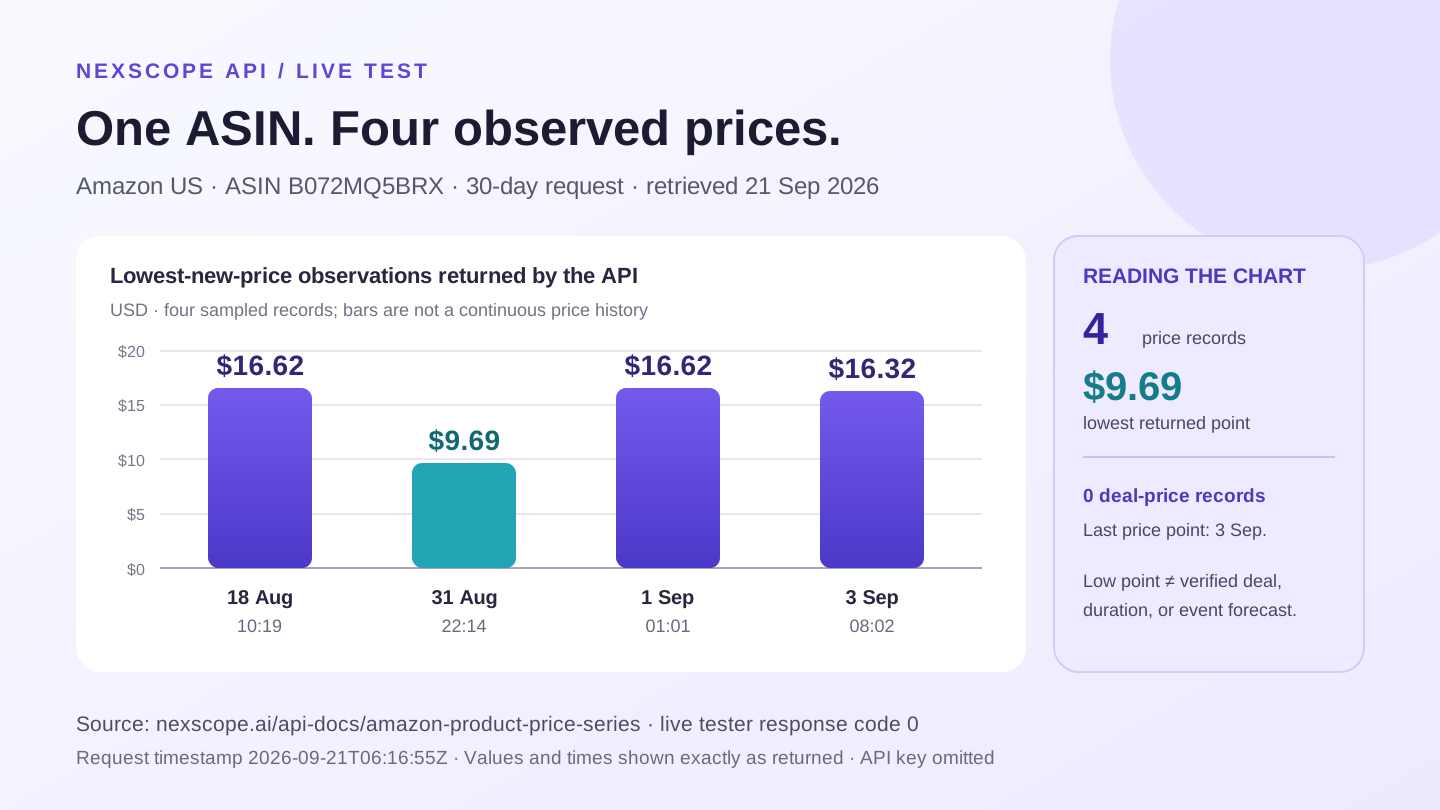
The response’s priceDeal array was empty. Its lone pricePrime value was -1, which we do not treat as a valid price; its priceList record was dated in 2025. Some returned records also fell outside the requested 30-day window, so inspect each timestamp instead of assuming the parameter created a complete daily series. The last returned price observation was September 3, not the September 21 request date. These data cannot establish the product’s current price, the cause or duration of the August 31 low, or any October 2026 event outcome. They illustrate the exact follow-up question a seller should ask: was the low a comparable offer, and can a more complete history confirm its context?
How can you tell whether a competitor’s deal is meaningful?
Compare the event price with a documented baseline, not just a crossed-out number. Amazon says shoppers can use Alexa for Shopping and its price-history feature to inspect past prices and set deal alerts. That makes an unsubstantiated “biggest discount” story less persuasive; it does not tell you how much a competing seller earns or whether their promotion is profitable. See Amazon’s 2026 event announcement and its price-history explanation.
For each competitor, ask:
- Is the compared price for the same ASIN variation, quantity, and seller offer?
- Does the available history show a sustained normal price, a recurring promotion, or too little data to tell?
- Is the visible price affected by a coupon, Prime eligibility, shipping, or a bundle that your data source may not capture?
- Did ratings, seller count, stock status, or category change at the same time?
- If BSR moved, did it move within the same category and marketplace? Amazon explains that BSR is category-relative and is not the same thing as organic keyword ranking.
A price cut followed by a better BSR is an observation, not proof that the cut caused more sales. Advertising, inventory, seasonality, and outside traffic can change simultaneously. Use your own seller-account reports to test the commercial outcome.
What should you monitor on October 6–7?
Use a fixed observation schedule and record changes, rather than refreshing at random. Amazon says its “Today’s Big Deals” drops are scheduled three times daily during the US event—midnight, 8 a.m., and 1 p.m. Pacific time. Those are useful checkpoints, not a guarantee that a particular competitor appears in a drop.
At each checkpoint, capture the same fields for your shortlist: price, offer or coupon presentation, availability, rating, seller count, and the collection time. Keep screenshots or source URLs where practical. If a listing disappears, record it as unavailable rather than assigning it a zero price.
Use a simple triage rule:
| Observation | Better next question | Avoid |
|---|---|---|
| Competitor price falls | Is this a comparable offer, and can our unit economics support a response? | Automatically matching the lowest price |
| Competitor gains visibility | Which query, category, and ASIN variation are involved? | Calling a BSR movement “sales growth” |
| Review concern repeats | Can our product page answer the concern with verified facts? | Copying another seller’s claims |
| Stock or offer changes | Is the data fresh and is the seller still eligible? | Treating one missing snapshot as a trend |
If you use an AI assistant to summarize the evidence, require it to show the source ASIN, marketplace, timestamp, and metric behind each recommendation. Keep final price and ad-spend decisions under human review.
What should you review after the event?
Compare before, during, and after on the same timeline. Check the event window against your September 21–October 5 baseline, then inspect the first post-event week. Note which competitors reverted their prices, which kept promotions running, and whether the available BSR or keyword signals persisted. The short post-event window is a diagnostic starting point, not a claim about long-term demand.
For your own products, use measured sessions, conversion, advertising spend, contribution margin, returns, and inventory data. A competitor research API cannot replace those private account metrics. Record what the external data suggested, what your internal results showed, and which assumptions were wrong. That review is more useful for the next shopping event than a generic list of “winning products.”
Prime Big Deal Days 2026 seller checklist
- Confirm the marketplace and its local event dates.
- Choose comparable ASINs and document their variations.
- Save a pre-event price and listing baseline with timestamps.
- Review available price history, BSR context, keywords, and customer objections separately.
- Set a minimum acceptable margin using your own costs and fees.
- Observe the same competitor set at planned event checkpoints.
- Preserve missing data and avoid causal claims from one snapshot.
- Compare the event with your measured post-event results.
Start with one category and five comparable products. Explore the Nexscope Amazon APIs and verify each endpoint’s current inputs, marketplace coverage, response fields, credits, and access requirements before automating the workflow. For deeper interpretation, see our Amazon price-history guide and competitor keyword research workflow.
Last reviewed: 2026-09-21 · Maintained by the official Nexscope team.
Put your next idea to work.
Find a practical workflow, compare the options, or explore the APIs behind it.