
1688 image search: how to find and vet sourcing candidates
By Nexscope Team · Updated September 20, 2026
A product photo can start a 1688 sourcing search, but it cannot tell you which listing is the original factory or which supplier can deliver your exact specification. Alibaba Group describes 1688 as a domestic wholesale marketplace. The practical job for an overseas seller is to turn visual matches into a small, reviewable list of offers, then verify those offers before paying.
The short answer: run 1688 image search with a suitable product photo, record the returned listing IDs, compare price and minimum order quantity on a like-for-like basis, inspect the promising listings in Product Detail, and use Chinese-keyword search to catch alternatives the photo missed. Treat the resulting shortlist as research, not supplier certification.
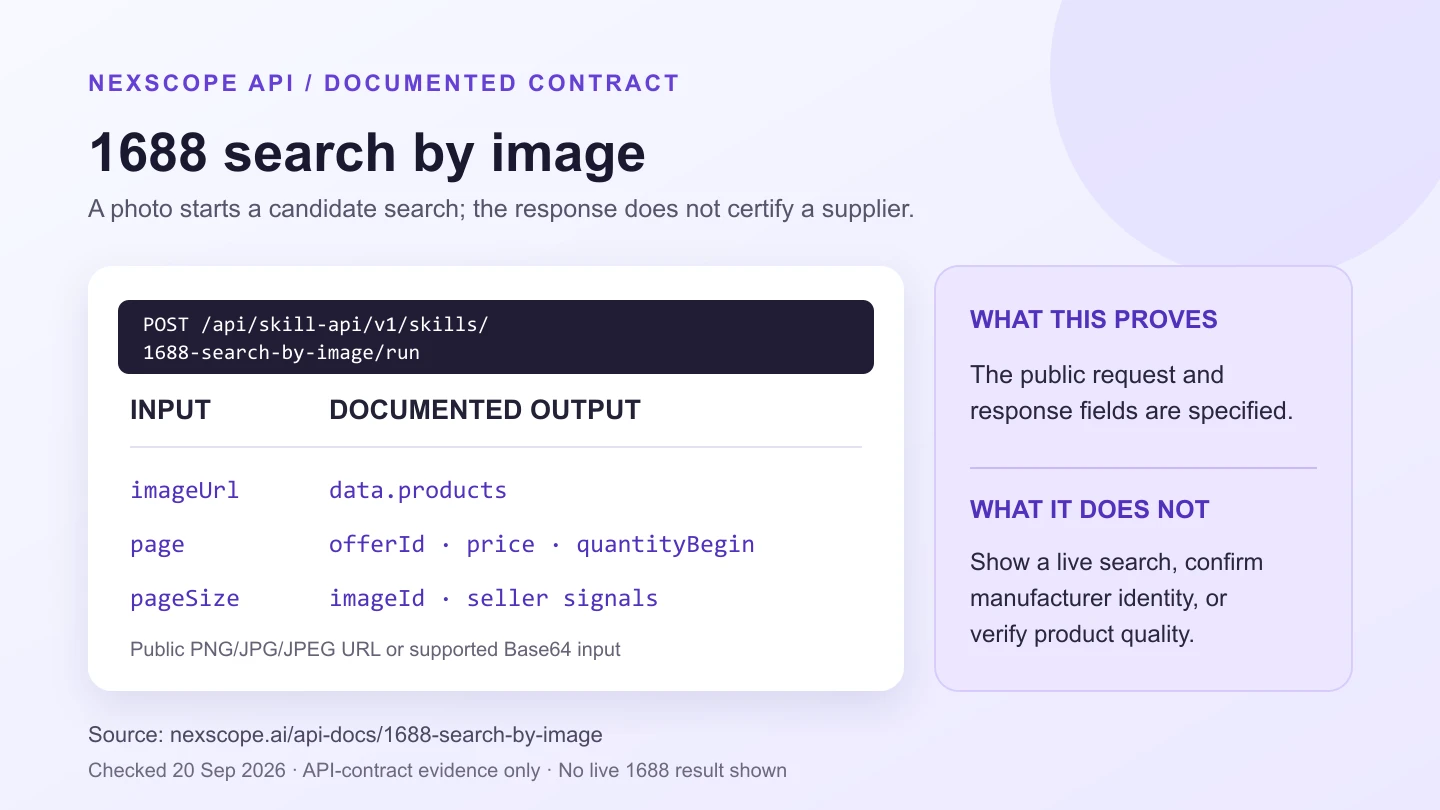
The figure summarizes the published API request and response contract. It shows which fields can support a sourcing shortlist, not what any particular photo returned.
One real image-search result (September 20, 2026)
We compressed our generated, unbranded amber-bottle concept image to a 192 × 192 JPEG and sent its raw Base64 through Nexscope’s Search By Image tester with page: 1 and pageSize: 10. The response returned HTTP 200, business code: 0, and 10 products on the first page. The account’s usage record shows 10 credits deducted for this successful call. This was a generated concept image, not an actual SKU photograph or a supplier-verification test.
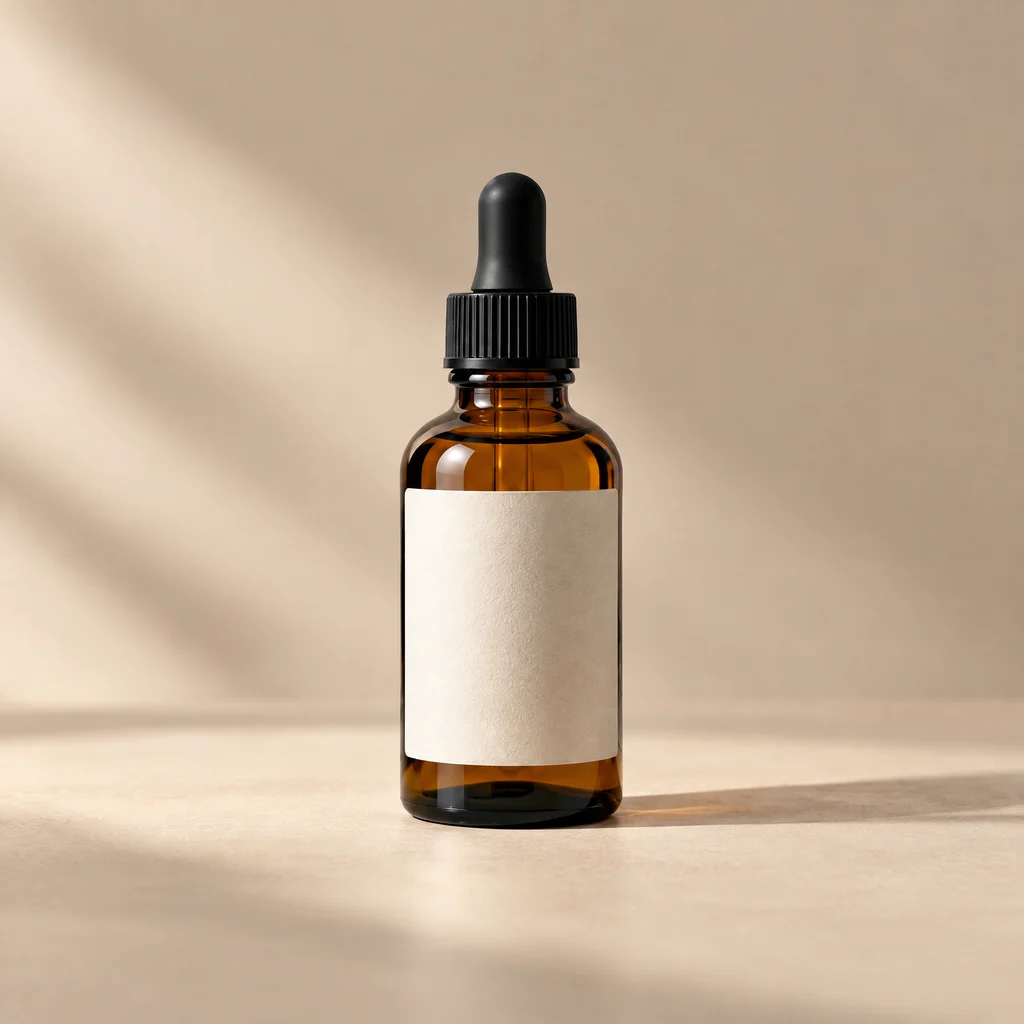
Returned offerId |
Listing, translated and shortened | Listed price | MOQ | Screening note |
|---|---|---|---|---|
993982844512 |
30 ml amber-glass dropper bottle | ¥0.45 | 1 | Visually relevant; material, volume, and seller still need checking |
1062847893340 |
30 ml amber dropper bottle | ¥0.29 | 2 | Another visual lead, not a verified equivalent |
1010396262324 |
Medical-style face mask | ¥1.88 | 3 | Off-target result; exclude from a bottle shortlist |
These are three selected rows from 10 returned, not a ranked recommendation. Prices and minimum quantities are the values in that response, not negotiated quotes or landed costs. We did not open Product Detail, contact a seller, order a sample, or verify any factory. The off-target mask illustrates why image-search output must be screened against a written product brief.
Three earlier public-image-URL attempts had returned business code 13007 (image download, image upload, and third-party timeout errors) without a credit deduction. Switching to the documented imageBase64 input succeeded in this one test; it does not prove that every URL will fail or every Base64 image will work. Check the JSON business code rather than HTTP 200 alone.
What can a photo actually find on 1688?
1688 image search finds visually similar listings, not proven manufacturers. Nexscope’s 1688 Search By Image API documents an eligible-image input and candidate products with available identifiers, titles, images, prices, minimum order quantities, seller signals, and dispatch information when a request succeeds. Our successful Base64 test returned both plausible bottle listings and unrelated products. A similar silhouette can still hide a different material, capacity, certification, or accessory set.
This matters when sourcing from a marketplace photo. A listing may use a shared catalogue image, a reseller’s photograph, or a similar-looking mold. The useful result is an offer to investigate. It is not evidence that the seller owns the image, owns the design, or is the manufacturer. If the reference image belongs to another brand, do not assume you can copy its branding or protected design.
How do you turn an image into a usable shortlist?
Start with a clean reference and a written product brief. A photo is good at describing shape but poor at specifying grade, dimensions, performance, and commercial terms. For an insulated bottle, write down the target capacity, material, lid type, color, packaging, desired quantity, target market, and whether you need customization before searching.
- Choose an eligible reference. The current Nexscope API documentation supports a publicly accessible PNG, JPG, or JPEG
imageUrl, or raw Base64 for those formats. WEBP and GIF are not listed as supported. Use an image you have the right to process and avoid sharing private product imagery through a public URL. - Run image search and keep the raw evidence. Record the query image, time, returned product
offerId, listing URL, image, displayed price,quantityBegin, seller name or identity, and any available sales or service signals. The response may include animageId; retain it for later pages. Missing fields should stay blank, not be inferred. - Check the actual offer. Pass a shortlisted
offerIdas a string to 1688 Product Detail. Its normalized response can includeskuList,saleInfo,shippingInfo, andcompanyName. Compare the specific variant you would order, not a generic headline image. - Search again by terms, not just appearance. The 1688 Product Search API supports a
keyWordin Simplified Chinese, price and MOQ filters, supplier-related filters, and sorting. Search the product’s material and function to find alternatives that look different but better fit the brief. - Ask for evidence from the finalists. Confirm company identity, sample quality, applicable price tier, lead time, production role, testing or compliance documents, payment terms, and shipping arrangement directly. Do not pay solely because an API returned a promising row.
A minimal image-search request body looks like this. Replace the example URL with your own eligible, publicly accessible image; this is a request template, not a live test or a real search result:
{
  "imageUrl": "https://your-domain.example/reference-bottle.jpg",
  "page": 1,
  "pageSize": 10
}
For the successful test above, we omitted imageUrl and sent "imageBase64": "<raw JPEG Base64>" instead, without a data:image/jpeg;base64, prefix. Supply exactly one of imageUrl, imageBase64, or imageId, as the live documentation specifies. The Base64 itself is intentionally not reproduced in this article.
The documented REST operation is POST /api/skill-api/v1/skills/1688-search-by-image/run with a bearer API key. Keep the key on your server, not in browser code or a shared document. Check the JSON code as well as the HTTP status: code: 0 means the request was accepted or succeeded, not that a suitable supplier was found. Read candidate listings from the returned data, preserve imageId for pagination when present, and treat missing optional fields as unknown. The live API reference is the source of truth for current inputs and billing.
Which 1688 API answers which sourcing question?
Use each endpoint for one decision. Image search discovers visual candidates; the other APIs add independent ways to inspect or challenge that initial shortlist. Combining them is more reliable than treating one image match as a purchase recommendation.
| Sourcing question | Nexscope capability | Evidence to keep | Important limit |
|---|---|---|---|
| What listings look similar to this item? | Search By Image | offerId, image, listed price, MOQ, seller and dispatch fields when present |
Visual similarity is not product or manufacturer identity |
| What other products match the specification? | Product Search | Simplified Chinese query, filters, price, quantity tier, sales period, store | Search results are not a quality audit |
| What does this exact offer say? | Product Detail | offerId, SKU options, sale and shipping fields, company name when present |
Listing data is not a confirmed purchase contract |
| What products appear in weekly or monthly rankings? | Product Billboard | Requested chart period, category/query, ranked offers | A ranking is context, not a forecast for your destination market |
For a broader procurement overview, see Nexscope’s 1688 supplier sourcing guide. This article concentrates on the narrower image-to-shortlist workflow and the API evidence needed to reproduce it.
How should you compare two similar offers?
Compare the same specification and order size before comparing price. The price field is a listed wholesale signal, while consignPrice, when returned, is a separate dropship-price signal. quantityBegin and quantity-tier information may change which price applies. Sales counts, repurchase rates, seller identities, and service scores can help prioritize questions, but none proves sample quality or supplier ownership.
Use a worksheet with one row per offerId and these columns: exact SKU and material; stated capacity or size; listed wholesale and dropship price; applicable quantity tier and MOQ; dispatch location and lead time; seller/company identifier; available service or transaction signal; unverified questions; sample result; and a final buyer decision. Keep the currency and observation date beside every price. Mark an absent field as “not provided,” not zero.
| Shortlist gate | Keep investigating when… | Do not infer… |
|---|---|---|
| Specification | The exact variant, material, size, and intended quantity can be checked | That a similar photo means the same product |
| Commercial fit | The applicable price tier, MOQ, freight assumptions, and lead time fit your written target | That the lowest displayed price is the final landed cost |
| Supplier evidence | You can request a sample and independently confirm company, production role, and required documents | That a platform badge certifies manufacturing or compliance |
If a required fact is missing, mark the offer pending verification rather than giving it a passing score. This gate is a proposed buyer workflow, not a Nexscope supplier rating or a tested ranking model.
For cross-border resale, a better comparison is estimated landed cost per sellable unit, not the lowest displayed 1688 number. Build your own estimate from the negotiated unit cost, packaging, domestic freight, export shipping, applicable duties and taxes, inspection, payment fees, and expected loss from defects. The API does not calculate a binding landed cost or establish customs compliance for you.
What must you verify before placing an order?
A data shortlist is the beginning of due diligence. Before money changes hands, ask the supplier to confirm the exact specification and variant in writing; request a sample; check company registration and whether the seller manufactures or trades; confirm production capacity, lead time, inspection rights, required safety or labeling rules in the destination market, and how defects or delays will be handled. Seek appropriate professional advice where compliance or intellectual-property rights are material.
The same caution applies to rankings. 1688 Product Billboard exposes weekly or monthly product ranking context, but a hot wholesale item does not prove end-customer demand in your market. Validate demand separately and document the period, category, and filters used.
A repeatable workflow for a small sourcing team
Make the decision trail reproducible. Save the original photo and brief, the image-search request, the raw response, the shortlist criteria, the detail lookups, and supplier replies. Then a teammate can see why an offer was shortlisted or rejected instead of relying on a screenshot and a vague “looks similar.”
For an initial test, choose one non-branded product you can inspect physically. Search by image, retain five candidate offer IDs, inspect the relevant SKUs, then run a Chinese-keyword search for the same material and function. Identify the two candidates that meet your written constraints and request samples. If none qualifies, that is a useful result: revise the specification or price target instead of lowering verification standards.
Nexscope’s 1688 APIs help with discovery and structured comparison. They do not place an order, certify a factory, guarantee a margin, or replace direct supplier and compliance checks. Explore the 1688 API documentation to choose the first read-only call for your sourcing workflow.
Frequently asked questions
Can 1688 image search identify the original manufacturer?
No. It can return visually similar listings. Verify who makes the product, who owns the design, and whether the sample matches your specification before you make a purchase decision.
Can I use a WEBP image URL?
The current Search By Image documentation lists PNG, JPG, and JPEG for a public imageUrl or raw Base64 input. Check the live API reference for any future format changes.
What should I call after image search?
Use the returned offerId with Product Detail, then use a Simplified Chinese product term with Product Search to find alternatives. Use Billboard only if weekly or monthly ranking context helps answer your research question.
Is the cheapest listed supplier the best choice?
Not necessarily. Verify the applicable quantity tier, MOQ, materials, sample, shipping, total landed cost, supplier identity, and terms. A listed price is a starting signal, not a final offer.
Sources and methodology: This guide was reviewed against Alibaba Group’s description of 1688 and Nexscope’s public image search, product search, product detail, and billboard API references on September 20, 2026. Three URL-based requests failed; one Base64 request succeeded and returned 10 first-page rows. The table reports three selected rows from that response. No supplier identity, product specification, purchase, or performance claim was independently verified. Fields may be absent or change; check the live documentation and returned data before use.
Last reviewed: 2026-09-20 · Maintained by the official Nexscope team.
Put your next idea to work.
Find a practical workflow, compare the options, or explore the APIs behind it.