Research products
Bring marketplace product and competitor signals into your applications. Query what you need instead of manually assembling every research brief.
Product & market data
Place a controlled MCP tool layer between an AI agent and marketplace research APIs. The agent can discover focused product, keyword, competitor and review tools while your backend keeps credentials, validation, rate limits and evidence handling outside the model context.
Explore the API docsOpens Nexscope · Account and credits may be required
{
  "marketplace": "us",
  "searchTerms": "travel mug",
  "needCount": 10
}Request illustration. Authentication and credits may be required.
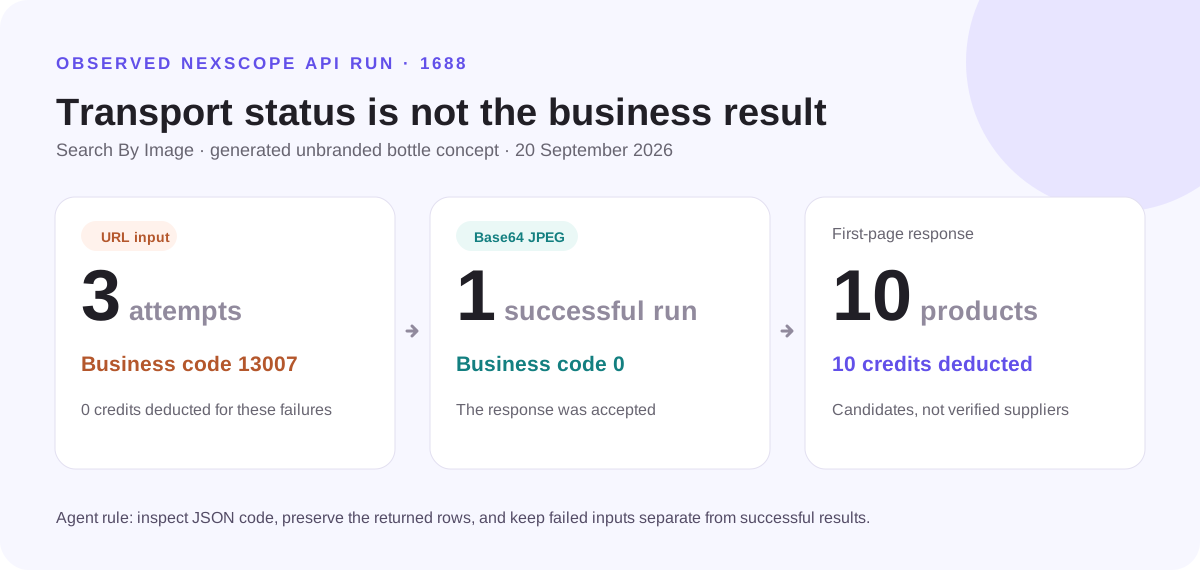
The JSON business code carried the decisive outcome in a documented 1688 image-search test. Three image-URL attempts returned code 13007 without a credit deduction. A raw Base64 JPEG request returned code 0, ten first-page products and a ten-credit charge. An agent should preserve that distinction before it recommends any candidate.
Move from a generic recommendation to a marketplace research workflow with explicit inputs, provider data and traceable limitations.
Bring marketplace product and competitor signals into your applications. Query what you need instead of manually assembling every research brief.
Product & market dataCombine keyword discovery and trend analysis with your own logic. Keep marketplace volume separate from normalized trend interest.
Keywords & trendsChoose supported API, MCP or Skill access. Use the documented request schemas and handle missing data, errors and credit usage explicitly.
API · MCP · SkillsKeep the workflow focused.
Keep the final decision yours.
Put a domain-oriented MCP server between the agent and the marketplace APIs. Expose focused read-only tools, normalize provider responses, keep credentials server-side, preserve source fields and timestamps, and require human approval before any action changes a listing, price, campaign or budget.
No. Coverage, fields and availability vary by capability and provider. Check the live catalog and documentation before building your workflow.
Production calls can require authentication and credits. Follow the current documentation for the chosen API; this marketing page does not execute calls.
The research APIs described here retrieve data. They do not imply permission to change listings, spend an advertising budget or perform store actions.
Start with one seller question and the API that can help answer it.
New to the protocol? Learn what an MCP server is and how ecommerce tools connect →
Explore the API docs